Buy gsq.eu ?
We are moving the project
gsq.eu .
Are you interested in purchasing the domain
gsq.eu ?
domain@kv-gmbh.de · 0541-91531010
Buy gsq.eu ?
How do you draw field lines?
To draw field lines, you first need to identify the source of the field, such as a charged particle or a magnet. Then, you can draw lines that represent the direction and strength of the field at different points. The lines should be drawn such that they are closer together in regions of stronger field and farther apart in regions of weaker field. Additionally, the lines should never intersect, as this would imply multiple directions for the field at a single point. **
How can one draw straight lines freehand?
To draw straight lines freehand, it is important to practice and develop a steady hand. Start by lightly sketching the line with short, quick strokes to establish the direction and length. Focus on a fixed point at the end of the line and use it as a guide to maintain a straight path. Additionally, keeping your arm and wrist loose while drawing can help create smoother, straighter lines. **


Similar search terms for JoyToys-Draw-Lines-Follow
Top-Angebote
Products related to JoyToys-Draw-Lines-Follow:
-
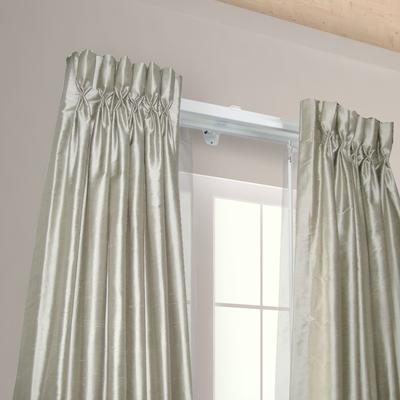
InStyleDesign Baton Draw White TraverseThis InStyleDesign Baton Draw White Traverse can steadily support many types of curtains, for ease of operation and child safety Set includes: One Heavy duty adjustable Baton draw Traverse Rod Adjustable Length, choose from : 30-48 inch, 48-84 inch,...62,15 $*Shipping: 0,00 $Secure redirect to the provider
-
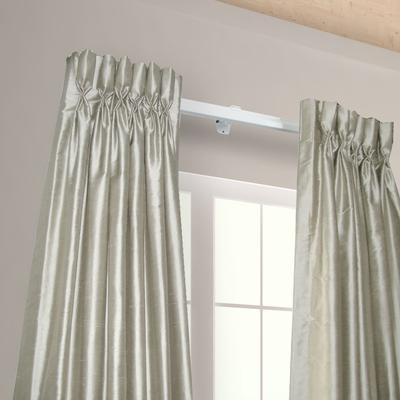
InStyleDesign Baton Draw Double White TraverseThis InStyleDesign Baton Draw Double White Traverse can steadily support many types of curtains, for ease of operation and child safety Set includes: One Heavy duty adjustable Baton draw Double Traverse Rod Adjustable Length, choose from : 30-48...101,49 $*Shipping: 0,00 $Secure redirect to the provider
-
JoyToys Draw Lines Follow Toy, Smart Inductive Robot Car That Follows Any Line, Ideal Educational Gift For Kids orange RobotUnleash your child's imagination with the Creative Inductive Electric Robot Toya smart little vehicle that magically follows any line you draw! This draw lines follow toy is designed to stimulate creativity and introduce basic STEM principles...21,97 $*Shipping: 0,00 $Secure redirect to the provider
-
JoyToys Draw Lines Follow Toy, Smart Inductive Robot Car That Follows Any Line, Ideal Educational Gift For Kids blue RobotUnleash your child's imagination with the Creative Inductive Electric Robot Toya smart little vehicle that magically follows any line you draw! This draw lines follow toy is designed to stimulate creativity and introduce basic STEM principles...21,97 $*Shipping: 0,00 $Secure redirect to the provider



-
How to draw arrow lines in VBA?
To draw arrow lines in VBA, you can use the `Shape` object and set the `ArrowHeadStyle` property to specify the type of arrow you want. You can also set the `BeginConnect` and `EndConnect` properties to connect the arrow to specific shapes or points. Additionally, you can use the `Line` method to draw a straight line and then customize it by setting the `ArrowHeadStyle` property. Overall, by using these properties and methods, you can easily draw arrow lines in VBA to enhance your Excel or PowerPoint presentations. **
-
Does Photoshop only draw straight lines now?
No, Photoshop does not only draw straight lines. It has a variety of tools and features that allow users to draw both straight and curved lines, as well as shapes and freeform designs. The Pen Tool, Brush Tool, and Shape Tool are just a few examples of the tools available for creating different types of lines and shapes in Photoshop. Additionally, users can also use the Path Tool to create custom paths and shapes with both straight and curved segments. Overall, Photoshop offers a wide range of drawing capabilities beyond just straight lines. **
-
How do you draw lines of action?
To draw lines of action, start by identifying the main movement or energy in the scene. Then, use fluid, curved lines to represent the direction and flow of that movement. These lines should convey the dynamic and expressive nature of the action, helping to guide the viewer's eye through the composition. It's important to keep the lines loose and gestural, capturing the essence of the movement rather than getting caught up in small details. Practice and observation of real-life movement can help improve your ability to draw convincing lines of action. **
-
How do you draw these lines in geometry?
In geometry, lines are drawn using a straight edge, such as a ruler or a triangle. To draw a line, place the straight edge on the paper and use a pencil to make a mark along the edge. Then, without lifting the straight edge, draw a line connecting the two points. This will create a straight line segment. To extend the line indefinitely, simply continue drawing the line in the same direction. **

How do you draw straight lines in space?
To draw straight lines in space, you can use a ruler or a straight edge to guide your drawing. Alternatively, you can use a straight piece of string or a taut wire to create a straight line. Another method is to use a laser level or a laser pointer to project a straight line onto the surface you are working on. Practice and precision are key to achieving perfectly straight lines in space. **
How do you draw arrow lines in VBA?
In VBA, you can draw arrow lines using the `Shape` object. You can create an arrow line by using the `AddLine` method of the `Shapes` collection and then setting the `ArrowHeadStyle` property to specify the type of arrowhead you want. For example, you can use the `msoArrowheadTriangle` constant to create a line with a triangular arrowhead. Additionally, you can set the `BeginArrowheadLength` and `EndArrowheadLength` properties to adjust the size of the arrowheads. **
Top-Angebote
Products related to JoyToys-Draw-Lines-Follow:
-
JoyToys Draw Lines Follow Toy, Smart Inductive Robot Car That Follows Any Line, Ideal Educational Gift For Kids yellow RobotUnleash your child's imagination with the Creative Inductive Electric Robot Toya smart little vehicle that magically follows any line you draw! This draw lines follow toy is designed to stimulate creativity and introduce basic STEM principles...21,97 $*Shipping: 0,00 $Secure redirect to the provider
-
Inspire Select Conductive Ink Circuit Repair Pen For DIY Electronics, Draw Instant Traces, Fix Broken PCB Lines, Fast Easy Tool black InkBring dead gadgets back to life with a simple strokeno soldering station required. This conductive ink tool lets you draw quick connections to help repair damaged circuit paths and create DIY electronic traces in seconds. Perfect for makers,...79,95 $*Shipping: 0,00 $Secure redirect to the provider
-
InStyleDesign Baton Draw White TraverseThis InStyleDesign Baton Draw White Traverse can steadily support many types of curtains, for ease of operation and child safety Set includes: One Heavy duty adjustable Baton draw Traverse Rod Adjustable Length, choose from : 30-48 inch, 48-84 inch,...62,15 $*Shipping: 0,00 $Secure redirect to the provider
-
InStyleDesign Baton Draw Double White TraverseThis InStyleDesign Baton Draw Double White Traverse can steadily support many types of curtains, for ease of operation and child safety Set includes: One Heavy duty adjustable Baton draw Double Traverse Rod Adjustable Length, choose from : 30-48...101,49 $*Shipping: 0,00 $Secure redirect to the provider
-
How do you draw field lines?
To draw field lines, you first need to identify the source of the field, such as a charged particle or a magnet. Then, you can draw lines that represent the direction and strength of the field at different points. The lines should be drawn such that they are closer together in regions of stronger field and farther apart in regions of weaker field. Additionally, the lines should never intersect, as this would imply multiple directions for the field at a single point. **
-
How can one draw straight lines freehand?
To draw straight lines freehand, it is important to practice and develop a steady hand. Start by lightly sketching the line with short, quick strokes to establish the direction and length. Focus on a fixed point at the end of the line and use it as a guide to maintain a straight path. Additionally, keeping your arm and wrist loose while drawing can help create smoother, straighter lines. **
-
How to draw arrow lines in VBA?
To draw arrow lines in VBA, you can use the `Shape` object and set the `ArrowHeadStyle` property to specify the type of arrow you want. You can also set the `BeginConnect` and `EndConnect` properties to connect the arrow to specific shapes or points. Additionally, you can use the `Line` method to draw a straight line and then customize it by setting the `ArrowHeadStyle` property. Overall, by using these properties and methods, you can easily draw arrow lines in VBA to enhance your Excel or PowerPoint presentations. **
-
Does Photoshop only draw straight lines now?
No, Photoshop does not only draw straight lines. It has a variety of tools and features that allow users to draw both straight and curved lines, as well as shapes and freeform designs. The Pen Tool, Brush Tool, and Shape Tool are just a few examples of the tools available for creating different types of lines and shapes in Photoshop. Additionally, users can also use the Path Tool to create custom paths and shapes with both straight and curved segments. Overall, Photoshop offers a wide range of drawing capabilities beyond just straight lines. **
Similar search terms for JoyToys-Draw-Lines-Follow
-
JoyToys Draw Lines Follow Toy, Smart Inductive Robot Car That Follows Any Line, Ideal Educational Gift For Kids orange RobotUnleash your child's imagination with the Creative Inductive Electric Robot Toya smart little vehicle that magically follows any line you draw! This draw lines follow toy is designed to stimulate creativity and introduce basic STEM principles...21,97 $*Shipping: 0,00 $Secure redirect to the provider
-
JoyToys Draw Lines Follow Toy, Smart Inductive Robot Car That Follows Any Line, Ideal Educational Gift For Kids blue RobotUnleash your child's imagination with the Creative Inductive Electric Robot Toya smart little vehicle that magically follows any line you draw! This draw lines follow toy is designed to stimulate creativity and introduce basic STEM principles...21,97 $*Shipping: 0,00 $Secure redirect to the provider
-
InStyleDesign Baton Draw White TraverseThis InStyleDesign Baton Draw White Traverse can steadily support many types of curtains, for ease of operation and child safety Set includes: One Heavy duty adjustable Baton draw Traverse Rod Adjustable Length, choose from : 30-48 inch, 48-84 inch,...99,99 $*Shipping: 0,00 $Secure redirect to the provider
-
InStyleDesign Baton Draw White TraverseThis InStyleDesign Baton Draw White Traverse can steadily support many types of curtains, for ease of operation and child safety Set includes: One Heavy duty adjustable Baton draw Traverse Rod Adjustable Length, choose from : 30-48 inch, 48-84 inch,...89,24 $*Shipping: 0,00 $Secure redirect to the provider
-
How do you draw lines of action?
To draw lines of action, start by identifying the main movement or energy in the scene. Then, use fluid, curved lines to represent the direction and flow of that movement. These lines should convey the dynamic and expressive nature of the action, helping to guide the viewer's eye through the composition. It's important to keep the lines loose and gestural, capturing the essence of the movement rather than getting caught up in small details. Practice and observation of real-life movement can help improve your ability to draw convincing lines of action. **
-
How do you draw these lines in geometry?
In geometry, lines are drawn using a straight edge, such as a ruler or a triangle. To draw a line, place the straight edge on the paper and use a pencil to make a mark along the edge. Then, without lifting the straight edge, draw a line connecting the two points. This will create a straight line segment. To extend the line indefinitely, simply continue drawing the line in the same direction. **
-
How do you draw straight lines in space?
To draw straight lines in space, you can use a ruler or a straight edge to guide your drawing. Alternatively, you can use a straight piece of string or a taut wire to create a straight line. Another method is to use a laser level or a laser pointer to project a straight line onto the surface you are working on. Practice and precision are key to achieving perfectly straight lines in space. **
-
How do you draw arrow lines in VBA?
In VBA, you can draw arrow lines using the `Shape` object. You can create an arrow line by using the `AddLine` method of the `Shapes` collection and then setting the `ArrowHeadStyle` property to specify the type of arrowhead you want. For example, you can use the `msoArrowheadTriangle` constant to create a line with a triangular arrowhead. Additionally, you can set the `BeginArrowheadLength` and `EndArrowheadLength` properties to adjust the size of the arrowheads. **
* All prices are inclusive of VAT and, if applicable, plus shipping costs. The offer information is based on the details provided by the respective shop and is updated through automated processes. Real-time updates do not occur, so deviations can occur in individual cases. ** Note: Parts of this content were created by AI.